Skip to content
ONE MENU — QR, PDF, ALLERGENS, STAFF SHEET

One menu update. Every service document stays aligned.

Crumb turns your menu and ingredient information into a branded QR menu, printable PDF, kitchen allergen matrix and front-of-house staff sheet — from one approved source.

30-day trial · Card required · Cancel anytime · See pricing

Opening a new venue or shaping the product with us? Founding restaurant programme →

30-day trial

Launch before your next service

EU 1169/2011

Built around the 14 regulated allergens

QR + print + proof

One menu source for every service output

The shift Crumb enables

From scattered documents to one approved workflow.

Before Crumb

Scattered documents

  • The guest menu is updated separately
  • The printed menu is stored in another file
  • The allergen spreadsheet may be outdated
  • Kitchen changes do not always reach front of house
  • Staff repeatedly ask which version is current
With Crumb

One approved workflow

  • One approved source of menu information
  • Guest, kitchen and service documents stay aligned
  • Changes are made once and reflected across outputs
  • Staff begin service with consistent information
  • Review activity can be recorded and checked
One source, every output

Update once. Publish everywhere.

Manage dishes, ingredients and allergen information in one place. Crumb then creates the documents your guests, kitchen and service team need.

Central source

Approved menu and ingredient source

Dishes, ingredients, allergen labels and modifications live in one place. Every output below is generated from this record.

Branded guest QR menu
Printable menu PDF
Kitchen allergen matrix
Front-of-house staff sheet
QR table cards
Review and audit records
Guided sample tour

See the guest experience before you build your first menu.

Walk through the flow your guests and staff will use: scan, filter, translate, check allergens, print, and keep every output aligned.

1

Scan the guest menu

See how guests filter allergens, switch languages, understand modifications, and decide what needs a staff conversation.

2

Review the service flow

Follow one dish from ingredient edit to live QR menu, menu PDF, staff sheet, kitchen matrix, and QR table card.

3

Start with a ready structure

Begin with a polished restaurant menu structure instead of rebuilding every dish, note, allergen label, and printable from scratch.

Designed to get a safer menu live before the next service

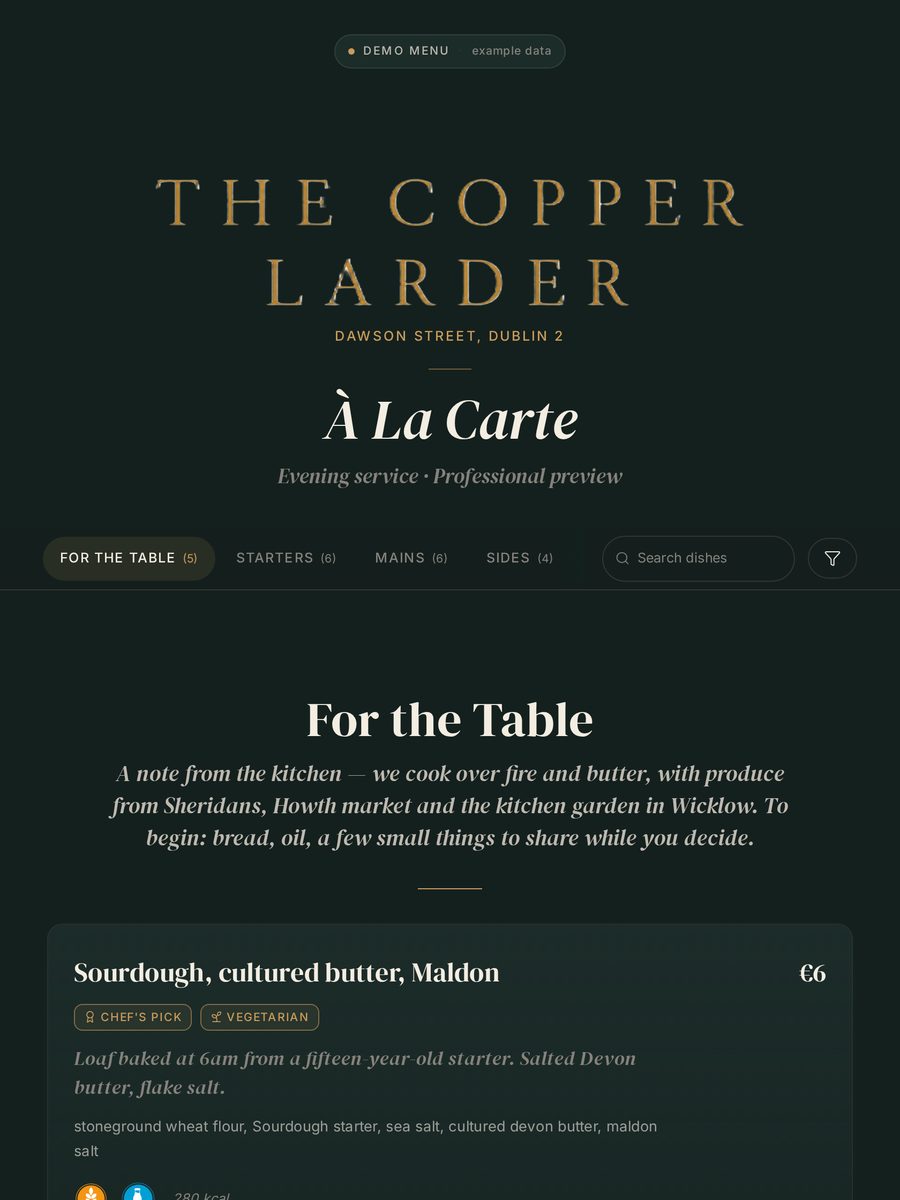
Four ways your menu can look.

Because a tasting menu, brasserie, hotel, and compliance-first operation should not all be forced into the same generic QR layout.

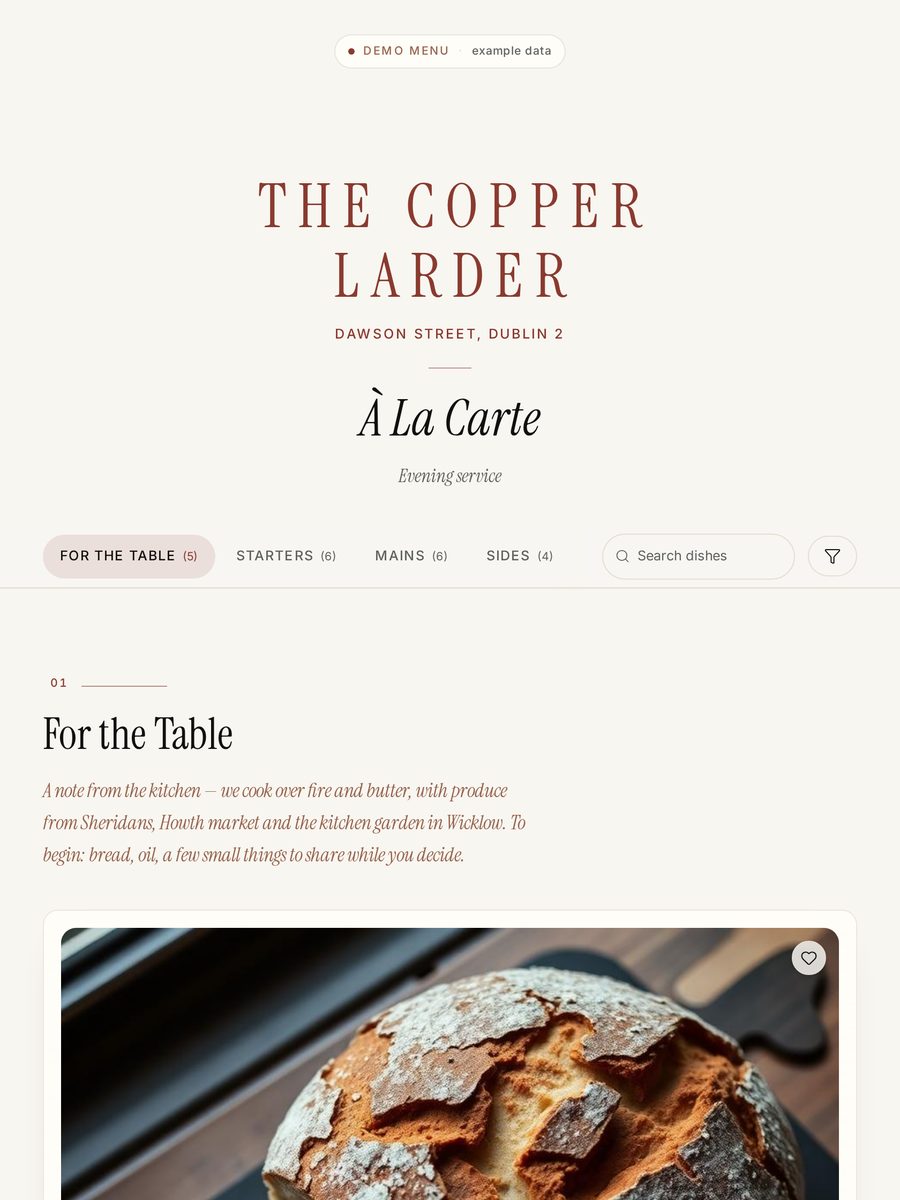
Editorial

Photography-led magazine layout. Large images, generous whitespace, confident serif headlines.

Best for

  • Premium independents
  • Strong photography
  • Instagram-driven venues
  • Restaurants with dedicated photography budgets
Preview this style →

Restaurant menu embed · for your website

Your live menu. On your own website.

Two lines of code embed your Crumb menu — dishes, prices, allergens — straight into your restaurant site. It inherits your fonts and colours, and updates the moment you edit.

No PDF. No QR-only. No developer round-trip.

  • Inherits your website's fonts, colours and spacing.
  • Allergens and dietary badges on every dish, every layout.
  • Edit once in Crumb — the site refreshes on next load.
  • Server-rendered HTML that search engines read as real content.
your-restaurant.com

Dinner · from our menu

Roast hake, brown shrimp butter

Kohlrabi, sea vegetables, dashi

Contains: fish, crustaceans, dairy
€28

Salt-aged Hereford beef

Bone-marrow crumb, charred alliums

Contains: gluten, dairy
€36

Beetroot & buttermilk

Rye toast, dill oil, horseradish

VegetarianContains: gluten, dairy
€19
<script src="https://crumb.menu/embed.js" defer></script>

Built for the moments allergen mistakes usually happen.

The guest scanning at the table. The waiter checking a substitution. The kitchen changing a supplier. The printed menu that must still match.

Guests choose with less uncertainty

Diners scan, filter allergens, spot possible modifications, and understand what needs a staff conversation before they order.

See the guest experience →

Staff answer from the same source

Ingredient changes flow into dishes automatically. Kitchen matrix and staff sheets are ready when service needs them.

Build your menu →

Owners see where guests hesitate

See which filters guests use, which dishes disappear for dietary needs, and where small modification changes open more of the menu.

See what you learn →
Allergen workflow, done properly

All 14 EU allergens. Every dish. Every time.

Most QR menus treat allergens as a note at the end of a dish. Crumb builds from the ingredient up — change a supplier once, and every affected dish, printout, and guest-facing answer follows.

Crumb tracks

  • Celery
  • Crustaceans
  • Eggs
  • Fish
  • Lupin
  • Milk
  • Molluscs
  • Mustard
  • Peanuts
  • Sesame
  • Soya
  • Sulphites
  • Tree nuts
  • Gluten

And handles

  • Contains vs may-contain distinction
  • Ingredient-level allergen inheritance
  • Strict mode for severe allergies
  • 'Can be made without' modifications
  • Optional entry disclaimer with acknowledgement logging
  • Menu PDF, kitchen matrix, and staff-sheet printables
  • EU 1169/2011 workflow support
Compliance evidence pack

Accuracy you can explain before service starts.

Crumb keeps allergen and nutritional information traceable from ingredients through to guest menus, QR menus, staff sheets, kitchen matrices, and printable review records.

14 EU allergens
Professional audit trail
PDF policies

EU allergen disclaimer

Crumb supports EU 1169/2011 allergen workflows, but it does not replace supplier verification, kitchen cross-contact controls, staff judgement, or final restaurant approval before service.

Recommended cadence: review records whenever suppliers, recipes, preparation methods, shared equipment, or published menus change — and complete a scheduled full review at least monthly.

Traceable source data

Ingredient records separate contains, may-contain, removable components, supplier notes, and nutrition fields before they reach a dish.

Review-before-publish workflow

Supplier changes, recipe edits, nutrition overrides, and kitchen-approved modifications stay visible until a responsible team member reviews them.

Professional audit trail

Document downloads and menu compliance acknowledgements are recorded in the admin Publish area for teams that need proof of review.

One publication record

Guest menus, QR links, staff sheets, kitchen matrices, and printable records are generated from the same approved menu state.

Clear responsibility framing

Crumb supports accuracy and auditability; restaurants remain responsible for supplier checks, kitchen process, and final guest-facing approval.

Turn common questions into clear answers

When guests can see what is possible, they stay in the menu.

“Can it be made without dairy?” should not depend on who is holding the section. Mark flexible ingredients once, and Crumb shows guests which dishes may still work before the conversation reaches the table.

38%

typical menu coverage for dairy-free guests without modifications flagged

67%

average coverage after flagging common substitutes

Illustrative example showing how optional modifications can affect which dishes remain visible when filters are applied. Not customer data.

How modifications work →
Where Crumb sits

More than a digital allergen menu.

Basic menu tools
  • Publish menus online
  • Display allergen filters
  • Generate QR codes
Crumb
  • Manages menu, ingredient and allergen information
  • Creates guest and operational outputs
  • Keeps QR, print, kitchen and staff documents aligned
  • Supports review and audit workflows
Full back-office systems
  • Inventory
  • Procurement
  • Purchasing
  • Recipe costing
  • Enterprise food-data management

Crumb gives restaurants the operational control missing from basic menu tools — without the complexity of a full kitchen-management platform.

How you go live

Not just another login. We help you get live.

Crumb is designed for busy hospitality teams. Instead of leaving restaurants to configure everything alone, guided onboarding helps organise the first menu, branding and operational documents before the restaurant reviews and approves the information.

  1. 01

    Share your existing menu

  2. 02

    Structure dishes, ingredients and allergen information

  3. 03

    Review the QR menu and operational documents

  4. 04

    Approve and publish

The restaurant remains responsible for reviewing and approving all ingredient, supplier, allergen and cross-contact information before publication.

Founding Restaurant Programme

A small cohort of restaurants helping us build Crumb.

We're working with a small group of early restaurants to shape Crumb. Founding restaurants lock in a founding price, get a direct line to the team, and help decide what we build next.

What founding restaurants get
  • A locked founding price for the life of your subscription
  • A direct line to the team building Crumb
  • Your feedback shapes the roadmap — features, defaults, priorities
  • Guided onboarding and a hand with your first menu
  • Restaurant approval before anything goes live
  • No obligation to continue after the pilot

Choose your venue count, then choose your level.

Solo is where an independent restaurant gets its menus, allergens, and printables under control. Professional and Enterprise are where serious and multi-site operators run daily service. Pick the level that matches how much your operation depends on getting service right.

Core

For restaurants that need essential menu, allergen, QR, PDF, kitchen matrix, and staff sheet tools.

Professional

For restaurants that need stronger review records, staff readiness, priority support, and advanced control.

30-day Core trialFull features · Card required at checkout
2 months free yearlyAnnual billing = 10 months paid
Founding pilotProfessional access + assisted setup, by application

Solo

One venue. Core or Professional.

From €39/ month

Core €39 · Professional €49

  • 1 venue, unlimited menus
  • All 14 EU allergens
  • Menu PDF, matrix, staff sheet
  • Branded QR codes
Most popular

Duo

Two venues sharing one standard.

From €69/ month

Core €69 · Professional €79 · 30-day trial

  • Up to 2 venues
  • Shared ingredient library
  • Team access across both venues
  • Everything in Solo, for both venues
Compare Core vs Professional →

Enterprise

3+ venues, SSO, SLA, integrations or tailored contracting.

Custom

Available subject to technical and commercial review

  • Unlimited venues and team members
  • Everything in Duo Professional, across every venue
  • Single sign-on options
  • Dedicated account care

Crumb is priced to stay accessible for independent restaurants while still supporting serious multi-site operators.

Common questions.

Crumb is currently recruiting its first founding restaurant pilots. The public demo menus use example data to show how the platform works.

Basic QR menus mainly display information to guests. Crumb helps manage the menu information behind the scenes — allergens, staff sheets, kitchen matrices, PDFs, translations, review records, and venue workflows — so service starts with one approved source instead of four versions in four places.

No. Core is designed for independent restaurants that need a simple, reliable menu and allergen workflow. Professional, Duo and Group plans add more control for larger and multi-site operations.

Professional is for restaurants that want stronger review records, staff readiness tools, priority support and advanced control. Core covers accurate menus and allergens; Professional adds the review, audit and service-readiness workflow on top.

No. Crumb provides tools for organising, reviewing and publishing menu and allergen information. The restaurant remains responsible for verifying ingredients, suppliers, preparation methods, cross-contact risks and staff training.

Yes. Restaurants can self-serve or choose Assisted Launch, Full Menu Migration or Multi-site Onboarding. See the setup options on the pricing page.

A first draft typically appears within an hour of importing — dishes, prices and ingredient allergen suggestions come across automatically. Going live usually takes a few focused sessions across a week, because a chef still needs to verify allergens dish by dish. That verification is the point.

No. Typographic, Hybrid and Matrix styles are designed to work beautifully without a single photo. Choose the style that matches your restaurant, not the other way around.

Crumb is structured around the 14 allergens listed in EU Regulation 1169/2011, with contains vs may-contain distinction, ingredient-level tracking, and an optional guest acknowledgment disclaimer with session logging. It gives your team the structure to manage that information clearly — final responsibility for accuracy still sits with the restaurant.

Yes. Custom colours from a curated palette, embedded venue logo, custom header text and tagline. Download PNG, SVG, or print-ready PDF at A6 size.

Crumb can generate guest-ready menu PDFs, branded QR table cards, kitchen allergen matrices and staff sheets from the same menu source. The printed pack, service notes and QR menu all reflect the same dish and ingredient records.

Yes. Crumb uses one menu source for the guest QR menu, table cards, PDF menus, kitchen matrices and staff sheets. Change the dish once, then regenerate the materials that service needs.

Venues choose the languages they want to publish, then manage dish, section, menu and ingredient translations alongside the original content. Guests can switch language on the QR menu, while printed exports and staff materials continue to use the approved menu source.

Crumb separates contains, may-contain and can-be-made-without notes so guests and staff do not treat every warning the same. Severe allergy language can be surfaced through the disclaimer and strict filtering flow.

Yes. Guests can filter allergens and dietary needs from the QR menu, see which dishes remain and spot possible modifications before the conversation reaches the table.

Four roles: Owner, Manager, Editor, Viewer. Editors and Viewers can be scoped to specific venues — a Dublin editor can't accidentally change your Cork menu. Every role has permissions enforced at the database level, not just hidden in the UI.

Professional teams get a review pack covering allergen accuracy, nutrition data and kitchen review documents, plus activity records for document downloads and review acknowledgements. It helps show when the team reviewed the menu before publishing — it does not replace supplier checks, kitchen judgement or staff training.

Crumb handles daily-changing menus — reuse ingredients from your library, duplicate yesterday's menu as a starting template, publish in two clicks. For tasting menus and seasonal restaurants, Typographic style was specifically designed around this.

Your published menus stay live for 30 days so your guests don't hit broken links. Export everything to PDF at any time. Your data is yours — we'll hand it over in JSON on request, free of charge.

Yes. The 30-day trial includes every feature in the plan you pick at checkout — all menu styles, allergen tools, printables, translations and team permissions. A card is required at checkout; cancel from the billing page before the trial ends and you will not be charged.